Next time you visit the forum, you’ll be asked two short questions about your experience of blood cancer. Your answers add a small icon and title next to your name, so it’s easier to spot when someone in a conversation shares your experience. It’s completely your choice, and you can always choose ‘I would rather not say’.
Icons and titles
You may have already spotted some small icons on people’s profile pictures, and titles next to their names. These show:
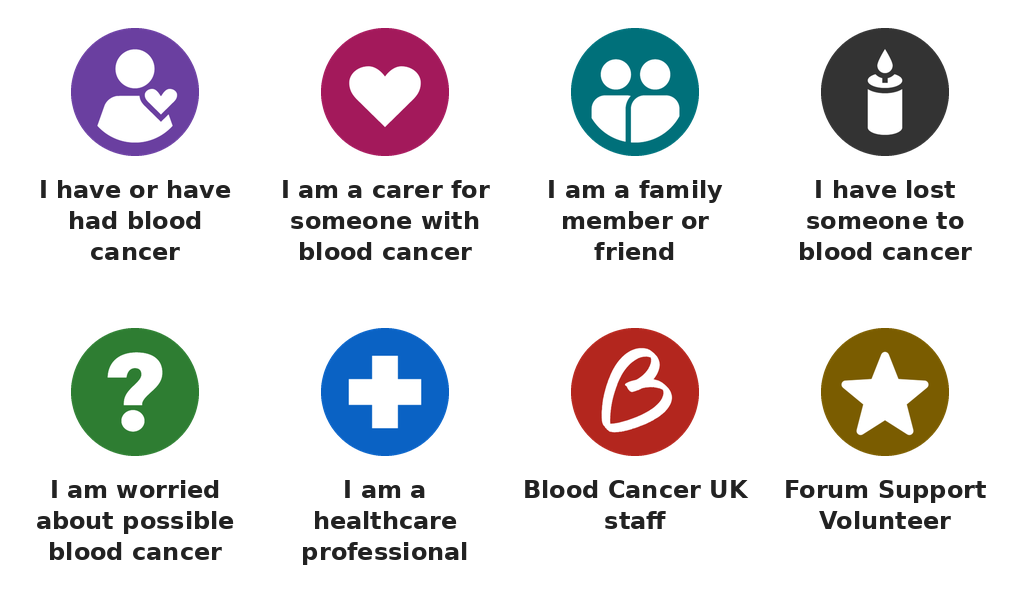
- The icon: someone’s connection to blood cancer, for example whether they have it themselves, care for someone, or have lost someone
- The title: the type of blood cancer that has affected them, for example “Myeloma” or “Hodgkin lymphoma”
This means that when you read a post, you can see at a glance whether someone has been through something similar, without having to click on their profile. You can hover over the icons when you see them for a description, or refer to the key below.
Here’s what each icon means:
What happens next?
Some forum members will receive a direct message about this change as well.
Then, on or around the time you next visit the forum, you’ll be asked two short questions via a pop up:
- Which of these best describes your connection to blood cancer?
- Which type of blood cancer have you, or someone close to you, been affected by?
Your icon and title won’t appear straight away. We’ll be adding them for existing members over the coming weeks, so don’t worry if nothing changes as soon as you’ve answered. Once they’re added, you’ll see them on your own posts too.
New members are already being asked these questions when they join, and get their icon and title straight away.
You’re in control
- It’s your choice. If you’d rather not share, just choose “I would rather not say” and nothing will be shown. You can do this for one question or both.
- We won’t use anything you’ve told us before via previous demographic questions. Only your answers to these new questions will be used.
- Who can see what. Other members see your icon and title next to your name around the forum. Only the forum team can see the full list of who’s in each group.
- You can change things at any time. Choose which icon and title show, or remove them, in your account preferences under Flair and Title.
- You can join or leave groups on the groups page. You’re welcome to join as many groups as are relevant to you, but you’ll have to choose which icon/flair you’d like displayed as there can only be one of each shown at a time.
Questions?
If you have any questions, please reply below, or email us at support@bloodcancer.org.uk. This is new for us too, so we’d welcome your feedback.
Thank you for being part of our community!
Ceri - Blood Cancer UK Team